INTELLIGENT SYSTEMS. HUMAN IMPACT.

Intelligence for
the real world.

People. Communities. Industry.
Connected by what’s possible.

Purpose-built AI platforms and executive intelligence that help you see clearly, work smarter, and move forward—with people always in control.

Explore the ecosystem
04Specialized
platforms
Human-led.
AI-enabled.
THE AEOD ECOSYSTEMEXPLORE / 01
AEODTECHNOLOGIES
Drag to explore. Select a platform.
EXECUTIVE LEADERSHIPMUNICIPAL OPERATIONSCONSTRUCTION & INFRASTRUCTUREAGRICULTURAL INTELLIGENCE

01 / OUR PLATFORM ECOSYSTEM

Different worlds.
One forward direction.

Four specialized environments. A shared commitment to turning intelligence into practical progress.

Choose your environment. See the actual experience.

EXECUTIVE INTELLIGENCE

A clearer view. A stronger next move.

Chief of Staff Executive Services brings priorities, preparation, decisions, and follow-through into a human-led executive workflow.

Start a conversation
Chief of Staff Executive Services logo

One AEOD ecosystem. Each platform retains its own identity and operating environment. Connections are designed around your needs.

THE WORK BEHIND THE EXPERIENCE

See what changes.
Know what you get.

Go beyond the 3D introduction. Explore the operating workflows, capability areas, and product materials behind each AEOD platform.

Sterling existing logo

Executive intelligence

Sterling Digital Chief of Staff

AEOD PLATFORM GUIDE

YOUR EXECUTIVE INTELLIGENCE LAYER

Lead with clarity.
Follow through with confidence.

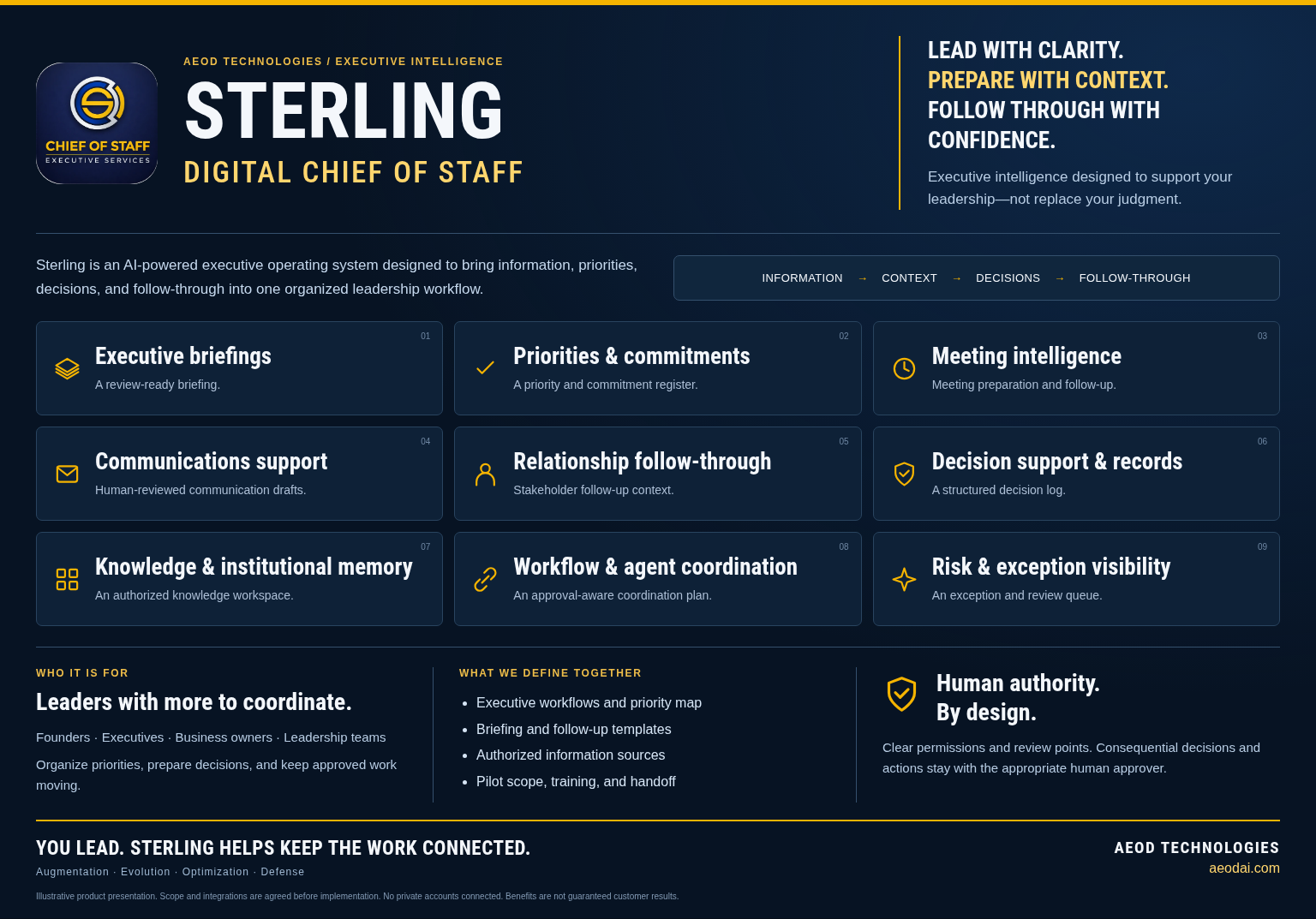
Sterling is an AI-powered executive operating system designed to bring information, priorities, decisions, and follow-through into one organized leadership workflow.

Instead of replacing leadership judgment, Sterling helps prepare the work around it: the context to review, the decision to make, the next step to assign, and the commitment to revisit. The experience is configured around your organization’s priorities, authorized information sources, and approval rules.

Executive clarityCoordinated executionHuman authority

THE EXECUTIVE WORKFLOW

01Information
02Context
03Decisions
04Follow-through
BUILT AROUNDFounders, executives, business owners, and leadership teams

BEFORE & AFTER / Sterling

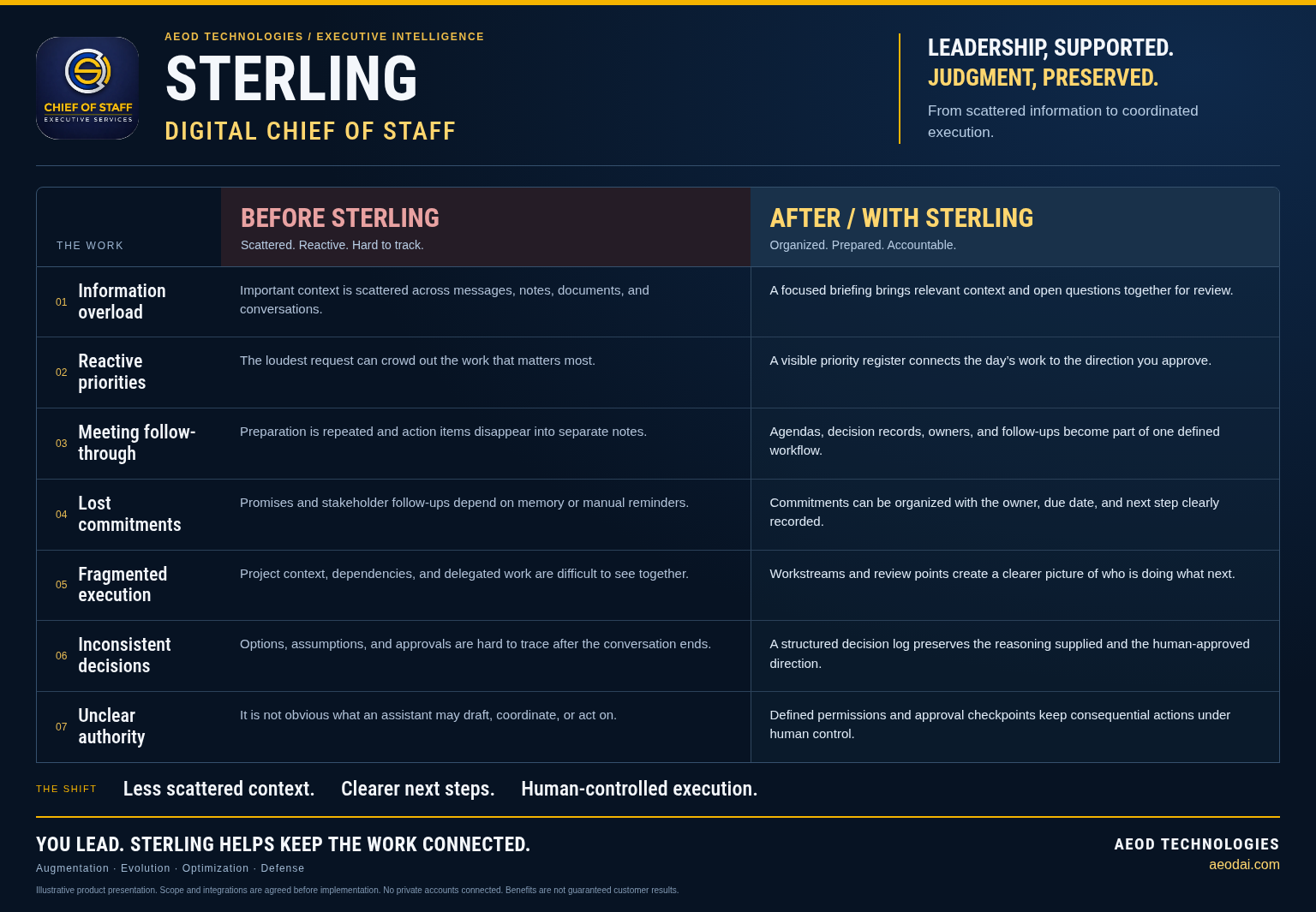
From scattered information to coordinated execution.

WORKFLOW COMPARISON
Before and after Sterling Digital Chief of Staff: illustrative operating workflow comparison
The workBEFOREScattered. Reactive. Hard to track.AFTER / WITH STERLINGOrganized. Prepared. Accountable.
01Information overloadBeforeImportant context is scattered across messages, notes, documents, and conversations.With SterlingA focused briefing brings relevant context and open questions together for review.
02Reactive prioritiesBeforeThe loudest request can crowd out the work that matters most.With SterlingA visible priority register connects the day’s work to the direction you approve.
03Meeting follow-throughBeforePreparation is repeated and action items disappear into separate notes.With SterlingAgendas, decision records, owners, and follow-ups become part of one defined workflow.
04Lost commitmentsBeforePromises and stakeholder follow-ups depend on memory or manual reminders.With SterlingCommitments can be organized with the owner, due date, and next step clearly recorded.
05Fragmented executionBeforeProject context, dependencies, and delegated work are difficult to see together.With SterlingWorkstreams and review points create a clearer picture of who is doing what next.
06Inconsistent decisionsBeforeOptions, assumptions, and approvals are hard to trace after the conversation ends.With SterlingA structured decision log preserves the reasoning supplied and the human-approved direction.
07Unclear authorityBeforeIt is not obvious what an assistant may draft, coordinate, or act on.With SterlingDefined permissions and approval checkpoints keep consequential actions under human control.
You lead. Sterling helps keep the work connected.Designed to support better work. Outcomes depend on implementation and use.

Illustrative workflows and intended benefits. Not measured customer results or a promise that every feature is included in every deployment.

WHAT YOU GET

A clearer scope. A more useful system.

A defined executive workflow—not just another chat window. These capability areas shape the scope you review with AEOD.

01
Executive briefings

Bring priorities, context, open questions, and upcoming decisions into a focused leadership briefing.

WORK PRODUCTA review-ready briefing
02
Priorities & commitments

Organize approved priorities and follow-ups with owners, due dates, and clear next steps.

WORK PRODUCTA priority and commitment register
03
Meeting intelligence

Prepare agendas and context; turn approved meeting notes into decisions and action items.

WORK PRODUCTMeeting preparation and follow-up
04
Communications support

Prepare messages, summaries, and responses in your preferred tone for review before sending.

WORK PRODUCTHuman-reviewed communication drafts
05
Relationship follow-through

Keep important stakeholder context and agreed next steps visible, using authorized records.

WORK PRODUCTStakeholder follow-up context
06
Decision support & records

Frame options, assumptions, risks, and unanswered questions while recording approved decisions.

WORK PRODUCTA structured decision log
07
Knowledge & institutional memory

Organize approved reference material so relevant context can be found and its source understood.

WORK PRODUCTAn authorized knowledge workspace
08
Workflow & agent coordination

Help coordinate scoped work across approved people, tools, and specialist agents within defined permissions.

WORK PRODUCTAn approval-aware coordination plan
09
Risk & exception visibility

Surface missing information, dependencies, and items that need leadership attention.

WORK PRODUCTAn exception and review queue

YOUR AGREED DELIVERY SCOPE

Know what is included.
Know who owns the next step.

Deliverables and acceptance criteria are documented before implementation. No inferred features or surprise integrations.

  • Executive workflow and priority map
  • Defined permission and approval boundaries
  • Configured briefing and follow-up templates
  • Authorized information-source plan
  • Pilot demonstration and acceptance criteria
  • Training, documentation, and ownership handoff
01
Discover

Clarify the people, work, and priorities.

02
Define

Agree scope, sources, permissions, and approval rules.

03
Demonstrate

Test a bounded workflow against acceptance criteria.

04
Handoff

Train, document, review, and improve.

Scope, integrations, and automation permissions are agreed before implementation. This public showcase is illustrative and does not access private inboxes, calendars, executive records, or AEOD’s agent systems.

LOOK CLOSER

The Sterling story, at a glance.

Explore Sterling’s executive capabilities and the shift from scattered information to coordinated, human-led work.
Sterling artwork is a new illustrative product presentation, not a live customer account or measured before-and-after case study.

You lead. Sterling helps keep the work connected.

Let’s define the right starting point for your organization.

Discuss Sterling Full platform page
CivicFlo AI existing logo

Municipal operations

CivicFlo AI

AEOD PLATFORM GUIDE

AI FOR SMART CITIES

Intelligent workflows.
Stronger communities.

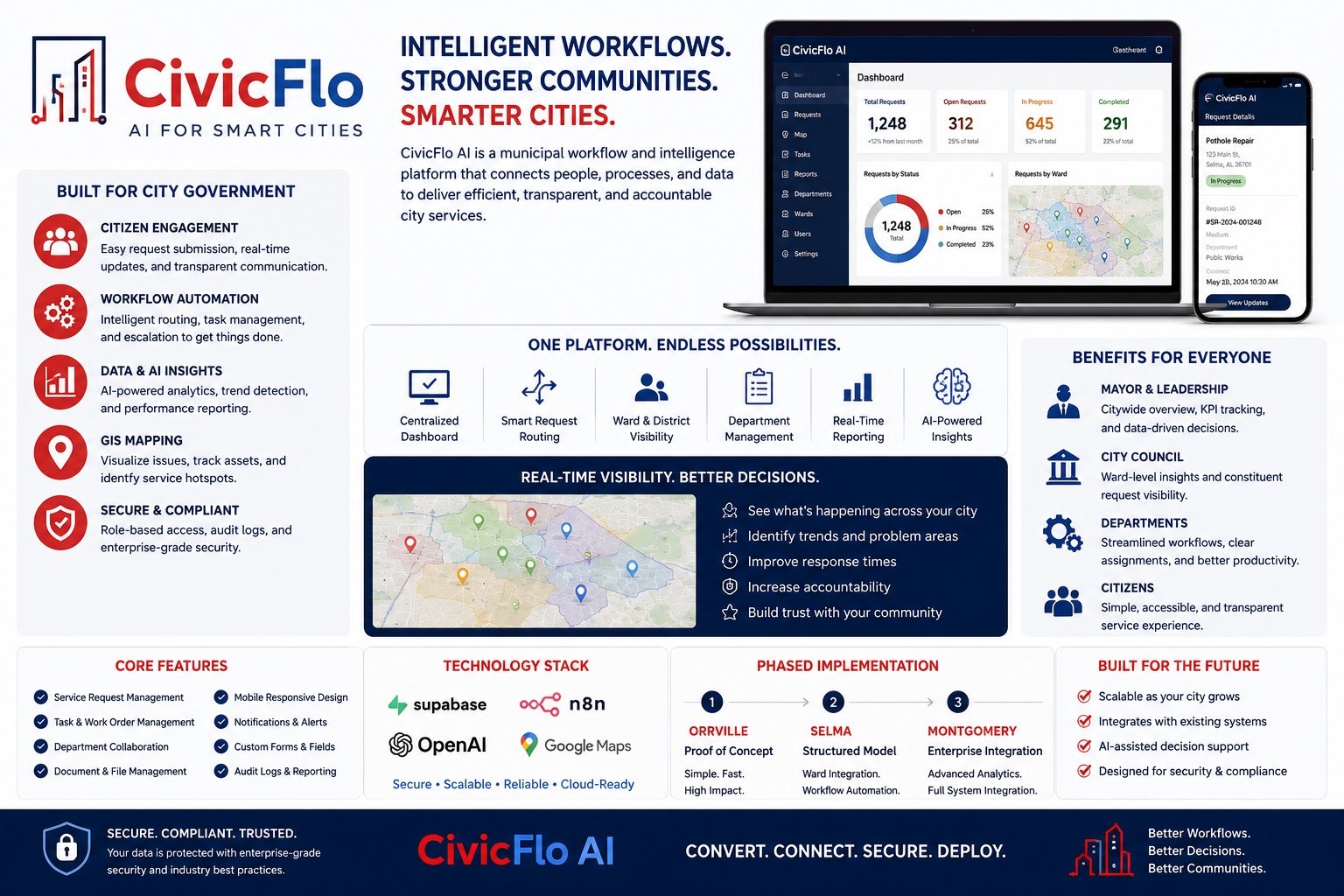
CivicFlo AI is a municipal workflow and intelligence platform designed to connect residents, departments, processes, and the information needed to deliver city services.

Bring service intake, assignments, progress updates, and operational context into a more connected municipal workflow. CivicFlo AI is organized around the people who request services and the teams responsible for delivering them.

Citizen accessDepartment coordinationService visibility

THE OPERATING WORKFLOW

01Request
02Route
03Coordinate
04Update
BUILT AROUNDMunicipal leadership, department teams, and the residents they serve

BEFORE & AFTER / CivicFlo AI

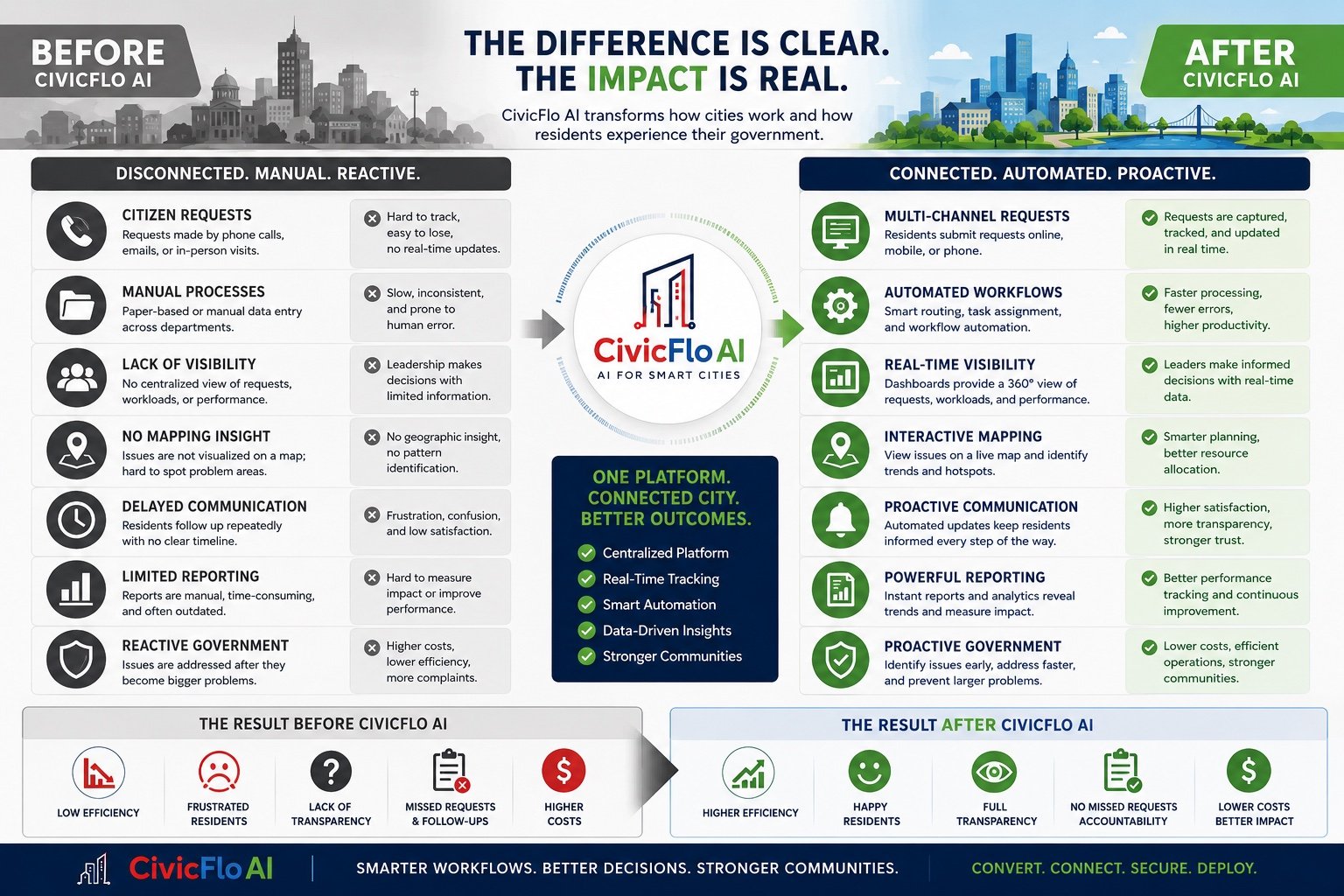
From disconnected requests to a clearer service journey.

WORKFLOW COMPARISON
Before and after CivicFlo AI: illustrative operating workflow comparison
The workBEFOREDisconnected. Manual. Reactive.AFTER / WITH CIVICFLO AIConnected. Coordinated. Visible.
01Citizen requestsBeforePhone calls, emails, and in-person reports can be difficult to reconcile.With CivicFlo AIA configured intake workflow gives requests an identifiable starting point and record.
02Manual processesBeforeRepeated data entry and handoffs create disconnected steps.With CivicFlo AIRouting and assigned next steps support a more consistent service workflow.
03Limited visibilityBeforeTeams and leadership may rely on separate status updates.With CivicFlo AIShared operational views make request status and workload easier to review.
04Location contextBeforeService issues are difficult to compare geographically.With CivicFlo AIConfigured mapping helps teams review locations, wards, and patterns together.
05Delayed communicationBeforeResidents repeatedly follow up for information.With CivicFlo AIDefined confirmations and progress updates create a clearer communication path.
06Manual reportingBeforeTime is spent assembling information from separate sources.With CivicFlo AIOrganized records support more consistent reporting and review.
07Reactive coordinationBeforeProblems become visible only after a service breakdown.With CivicFlo AIReview queues and escalation rules help teams identify items needing attention.
One platform. Connected city. Better outcomes.Designed to support better work. Outcomes depend on implementation and use.

Illustrative workflows and intended benefits. Not measured customer results or a promise that every feature is included in every deployment.

WHAT YOU GET

A clearer scope. A more useful system.

Explore the capability areas in the supplied CivicFlo AI materials. Access, live data, and integration availability are confirmed for each municipality.

01
Citizen engagement

Offer a clear starting point for requests, department access, and service updates.

WORK PRODUCTA defined resident intake journey
02
Request routing

Organize requests around the responsible department, owner, and next step.

WORK PRODUCTDepartment routing and escalation rules
03
Department workflows

Support configured forms and workflows for services such as licenses, clerk requests, and inspections.

WORK PRODUCTRole-appropriate service workflows
04
Work & request visibility

Bring request status, assignments, and workload context into an operational view.

WORK PRODUCTAn operational request dashboard
05
Mapping & location context

Explore service locations, ward context, and geographic patterns where mapping is configured.

WORK PRODUCTA scoped mapping and visibility plan
06
Updates & notifications

Define the confirmations and progress communications residents and teams need.

WORK PRODUCTA communication and notification workflow
07
Reporting & insights

Organize service activity and reporting requirements around meaningful operational questions.

WORK PRODUCTConfigured reports and review measures
08
Permissions & review

Define access, records responsibilities, review points, and escalation boundaries.

WORK PRODUCTA governance and access-control scope

YOUR AGREED DELIVERY SCOPE

Know what is included.
Know who owns the next step.

Deliverables and acceptance criteria are documented before implementation. No inferred features or surprise integrations.

  • Service and department workflow map
  • Configured intake and routing scope
  • Role and access requirements
  • Notification and escalation plan
  • Reporting and mapping requirements
  • Pilot, training, and acceptance plan
01
Discover

Clarify the people, work, and priorities.

02
Define

Agree scope, sources, permissions, and approval rules.

03
Demonstrate

Test a bounded workflow against acceptance criteria.

04
Handoff

Train, document, review, and improve.

Product materials are illustrative. Dashboard values, named implementation locations, and technology logos do not verify active deployments, endorsements, or live integrations. Scope and security requirements are validated for the municipality.

LOOK CLOSER

Your platform. In greater detail.

The AEOD-supplied overview and before-and-after artwork, kept intact. Open either piece to zoom and read the full detail.

Supplied artwork may include concept metrics, planned features, or draft contact details. Use this website’s AEOD contact controls. Capability, integration, compliance, and outcome claims require confirmation before public release.

One platform. Connected city. Better outcomes.

Let’s define the right starting point for your organization.
Discuss CivicFlo AI Full platform page
CrewFloPros existing logo

Construction & infrastructure

CrewFloPros

AEOD PLATFORM GUIDE

AI-POWERED CONSTRUCTION OPERATING SYSTEM

Built for construction.
Designed for people.

CrewFloPros connects people, projects, and processes in a construction operating environment designed to support clearer coordination from the office to the field.

Explore a defined operating workflow for bids, requirements, project activity, field reports, equipment, and financial context. The goal is to make the work easier to see and coordinate—not to replace professional judgment or contract review.

Project coordinationField visibilityCommercial awareness

THE OPERATING WORKFLOW

01Review
02Plan
03Coordinate
04Deliver
BUILT AROUNDGeneral contractors, specialty contractors, subcontractors, owners, and infrastructure teams

BEFORE & AFTER / CrewFloPros

From scattered paperwork to an organized project picture.

WORKFLOW COMPARISON
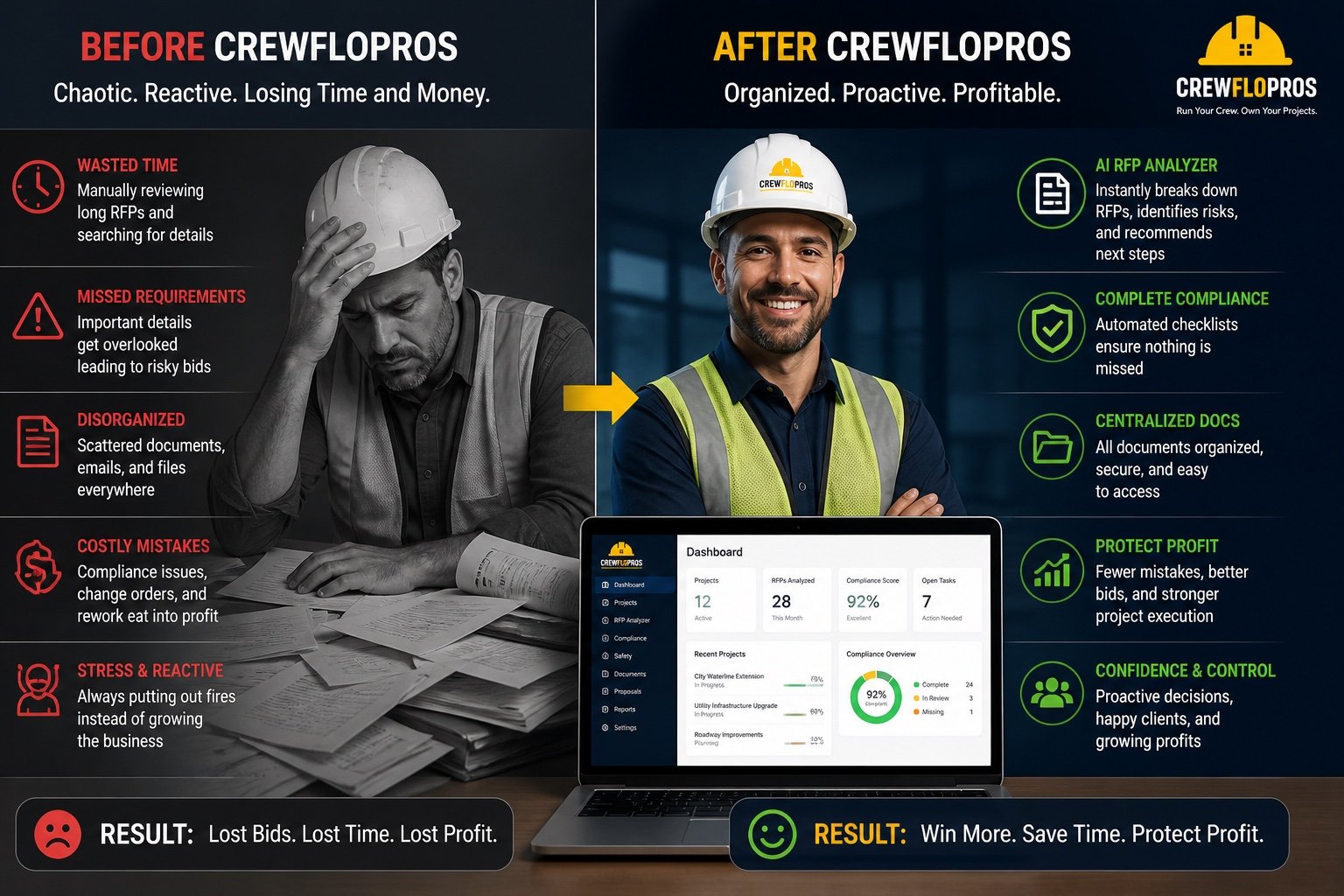
Before and after CrewFloPros: illustrative operating workflow comparison
The workBEFOREScattered. Reactive. Hard to coordinate.AFTER / WITH CREWFLOPROSOrganized. Visible. Ready to act.
01Time-consuming RFP reviewBeforeRequirements and details are manually assembled from long documents.With CrewFloProsAI-assisted organization can highlight information and questions for qualified human review.
02Missed requirementsBeforeCritical details can be lost between documents and handoffs.With CrewFloProsA defined requirement checklist makes review responsibilities more visible.
03Scattered documentsBeforeFiles, emails, and project records live in different places.With CrewFloProsAn organized document workflow gives the team a clearer reference point.
04Limited cost contextBeforeChanges and commitments are hard to compare with the financial picture.With CrewFloProsConfigured cost views help surface items that need commercial review.
05Reactive field workBeforeSite issues, equipment needs, and follow-ups compete for attention.With CrewFloProsAssigned actions and field reporting support a more coordinated operating rhythm.
06Unclear accountabilityBeforePeople are unsure who owns the next step.With CrewFloProsDefined owners, review points, and status updates make the handoff explicit.
Run your crew. Own your projects.Designed to support better work. Outcomes depend on implementation and use.

Illustrative workflows and intended benefits. Not measured customer results or a promise that every feature is included in every deployment.

WHAT YOU GET

A clearer scope. A more useful system.

A clearer view of the moving parts of construction. The final module set and supported connections are agreed for the project or business.

01
RFP & contract workflows

Help organize bid documents, requirements, questions, and review priorities.

WORK PRODUCTA structured bid and requirement review
02
Projects & work coordination

Bring tasks, responsibilities, project status, and workflow handoffs into view.

WORK PRODUCTA project and responsibility workspace
03
Safety & requirement tracking

Coordinate checklists, supporting documents, and review items that need attention.

WORK PRODUCTA human-reviewed requirements register
04
Daily logs & field reports

Define how site activity, progress, and issues are captured and reviewed.

WORK PRODUCTA consistent field reporting workflow
05
Inventory & equipment

Organize equipment, inventory, usage, and maintenance information within the agreed scope.

WORK PRODUCTAn equipment and resource register
06
Costs & commercial visibility

Bring budgets, expenses, billing context, and open commercial questions together.

WORK PRODUCTA cost and financial review workflow
07
Crew & stakeholder coordination

Connect approved assignments, responsibilities, and communications around the project.

WORK PRODUCTA crew and stakeholder coordination plan

YOUR AGREED DELIVERY SCOPE

Know what is included.
Know who owns the next step.

Deliverables and acceptance criteria are documented before implementation. No inferred features or surprise integrations.

  • Project and bid workflow assessment
  • Document and requirement structure
  • Crew and field reporting scope
  • Equipment and cost data requirements
  • Human review and approval points
  • Pilot, training, and handoff plan
01
Discover

Clarify the people, work, and priorities.

02
Define

Agree scope, sources, permissions, and approval rules.

03
Demonstrate

Test a bounded workflow against acceptance criteria.

04
Handoff

Train, document, review, and improve.

Illustrative benefits are not a guarantee of complete compliance, winning bids, profitability, or project performance. Qualified people remain responsible for contract, safety, financial, and operational decisions.

LOOK CLOSER

Your platform. In greater detail.

The AEOD-supplied overview and before-and-after artwork, kept intact. Open either piece to zoom and read the full detail.

Supplied artwork may include concept metrics, planned features, or draft contact details. Use this website’s AEOD contact controls. Capability, integration, compliance, and outcome claims require confirmation before public release.

Run your crew. Own your projects.

Let’s define the right starting point for your organization.
Discuss CrewFloPros Full platform page
AgriFloPros existing logo

Agricultural intelligence

AgriFloPros

AEOD PLATFORM GUIDE

AI-POWERED AGRICULTURAL OPERATING SYSTEM

Better information.
A clearer way forward.

AgriFloPros is designed to connect farm information, operational workflows, and decision support in an agricultural operating environment.

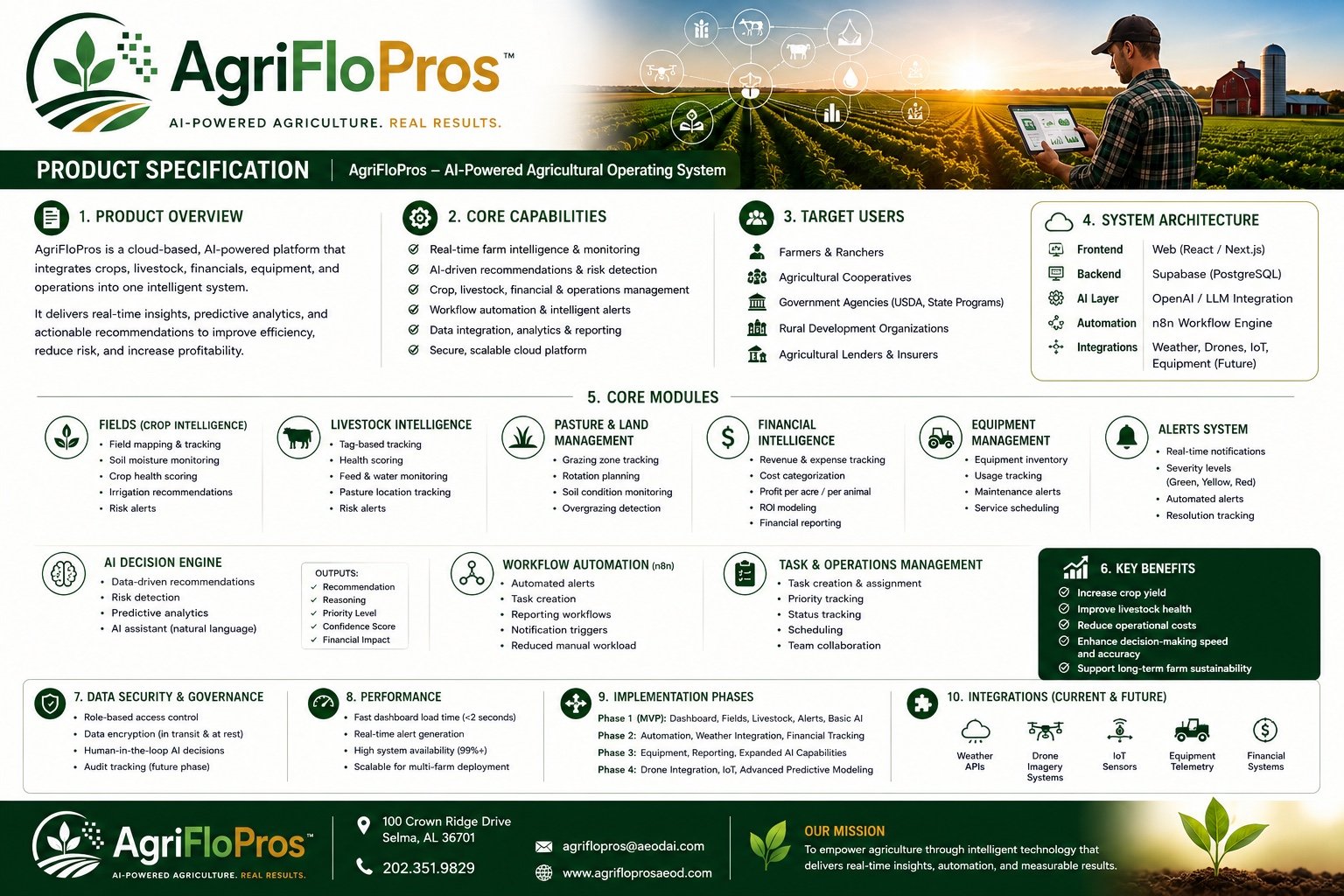
The supplied product specification maps a broad agricultural vision: crops, livestock, pasture, equipment, finances, alerts, and coordinated operations. A phased scope defines which modules and data connections are appropriate for the farm.

Farm visibilityOperational coordinationInformed decisions

THE OPERATING WORKFLOW

01Observe
02Understand
03Plan
04Review
BUILT AROUNDFarmers, ranchers, landowners, cooperatives, and agricultural partners

BEFORE & AFTER / AgriFloPros

From disconnected observations to a more informed farm view.

WORKFLOW COMPARISON
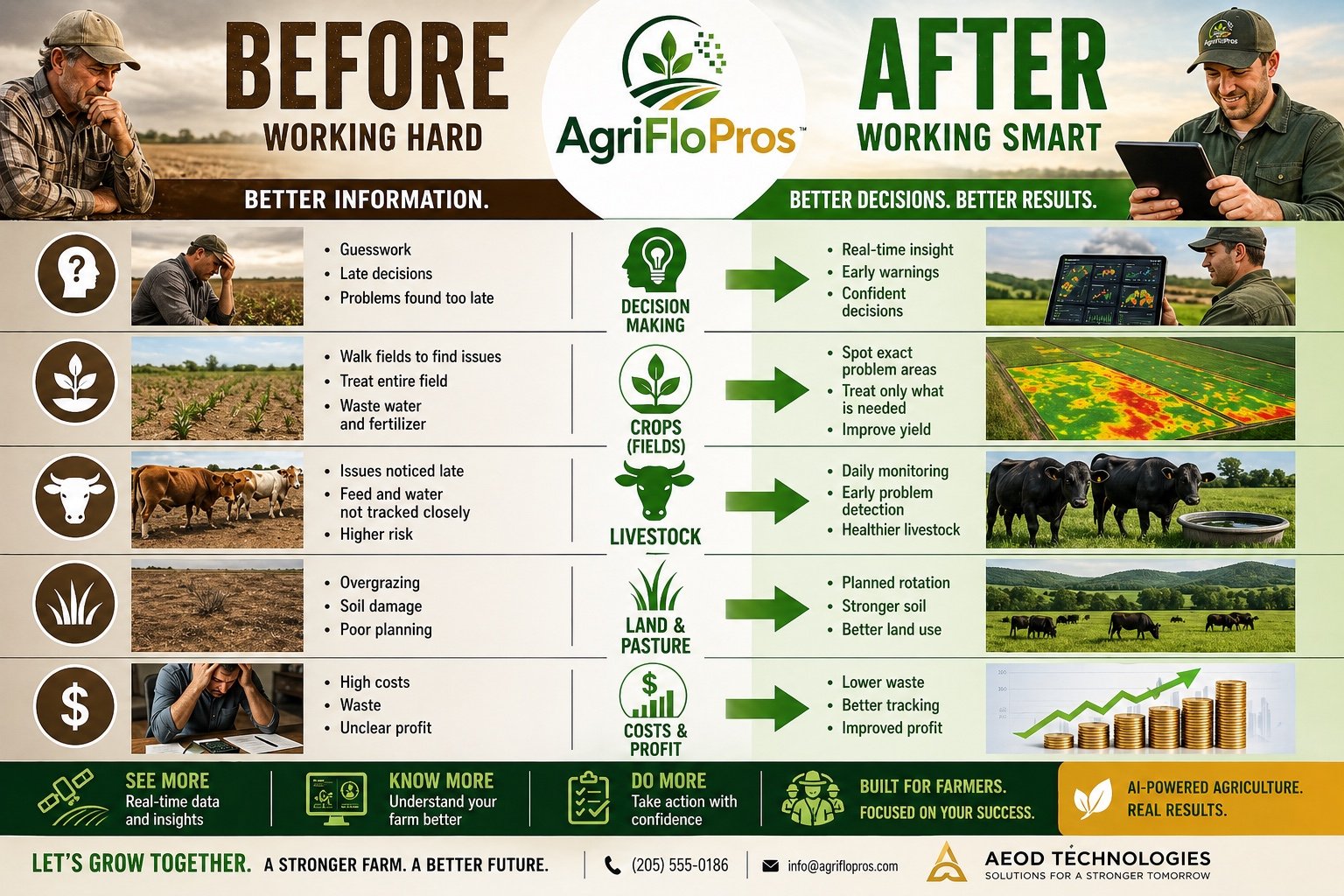
Before and after AgriFloPros: illustrative operating workflow comparison
The workBEFOREDisconnected records. Delayed visibility.AFTER / WITH AGRIFLOPROSBetter context. Coordinated next steps.
01Decision makingBeforeInformation arrives in separate records and problems may be noticed late.With AgriFloProsRelevant observations and configured alerts can be brought into one review process.
02Crops & fieldsBeforeIt is difficult to compare observations and locate areas needing attention.With AgriFloProsField context and approved monitoring data support more targeted investigation.
03LivestockBeforeAnimal, feed, water, and pasture records are hard to see together.With AgriFloProsA scoped livestock workflow organizes records and items needing review.
04Land & pastureBeforeRotations and land-management decisions rely on disconnected notes.With AgriFloProsA shared land and pasture plan makes planned actions easier to coordinate.
05Costs & resourcesBeforeExpenses, equipment, and operating context are difficult to reconcile.With AgriFloProsOrganized financial and resource information supports a clearer business review.
06Daily operationsBeforeFollow-ups are spread across observations, reminders, and conversations.With AgriFloProsDefined tasks, owners, and alert rules clarify what happens next.
Your farm. Your data. Your future.Designed to support better work. Outcomes depend on implementation and use.

Illustrative workflows and intended benefits. Not measured customer results or a promise that every feature is included in every deployment.

WHAT YOU GET

A clearer scope. A more useful system.

Understand the planned capability areas and the decisions they support. Livestock, pasture, sensor feeds, and advanced modeling must be confirmed for the rollout.

01
Fields & crop intelligence

Organize field information, crop observations, and approved monitoring inputs.

WORK PRODUCTA field and crop information workspace
02
Livestock workflows

Scope records and review workflows for animal status, feed, water, and pasture context.

WORK PRODUCTA livestock information and review plan
03
Pasture & land management

Bring rotation plans, land observations, and management tasks into view.

WORK PRODUCTA land and pasture coordination scope
04
Farm finances

Organize revenue, expenses, and cost context to support business review.

WORK PRODUCTA financial information workflow
05
Equipment management

Define equipment records, usage context, service tasks, and maintenance review.

WORK PRODUCTAn equipment and maintenance register
06
Alerts & operational tasks

Route configured alerts to the right person and define the next step.

WORK PRODUCTAn alert and task coordination workflow
07
AI-assisted decision support

Organize observations, assumptions, and recommendations for human evaluation.

WORK PRODUCTAn evidence-aware review process
08
Integrations & reporting

Scope authorized weather, satellite, sensor, or other data sources and reporting needs.

WORK PRODUCTA verified integration and reporting plan

YOUR AGREED DELIVERY SCOPE

Know what is included.
Know who owns the next step.

Deliverables and acceptance criteria are documented before implementation. No inferred features or surprise integrations.

  • Farm and operational needs assessment
  • Phased module and data-source scope
  • Field and resource information structure
  • Notification and human review rules
  • Reporting and pilot acceptance criteria
  • Training and operational handoff
01
Discover

Clarify the people, work, and priorities.

02
Define

Agree scope, sources, permissions, and approval rules.

03
Demonstrate

Test a bounded workflow against acceptance criteria.

04
Handoff

Train, document, review, and improve.

Features are scoped by implementation. Images and specifications describe intended capabilities, not verified uptime, response-time, yield, profit, or animal-health results. The website supplies no live agricultural advice or monitoring.

LOOK CLOSER

Your platform. In greater detail.

The AEOD-supplied overview and before-and-after artwork, kept intact. Open either piece to zoom and read the full detail.

Supplied artwork may include concept metrics, planned features, or draft contact details. Use this website’s AEOD contact controls. Capability, integration, compliance, and outcome claims require confirmation before public release.

Your farm. Your data. Your future.

Let’s define the right starting point for your organization.

Discuss AgriFloPros Full platform page

02 / THE AEOD APPROACH

A clear path from
possibility to progress.

Technology is only useful when it fits the people, processes, and decisions it is meant to support.

01

Understand first.

Start with education, discovery, and assessment. Understand the work before prescribing the technology.

EDUCATION + DISCOVERY
02

Design with purpose.

Connect strategy to the right solution. Make the requirements, responsibilities, and success criteria clear.

STRATEGY + SOLUTION DESIGN
03

Put it to work.

Pilot, learn, and implement. Equip the people who will use the system with the training they need.

PILOT + IMPLEMENTATION
04

Keep moving forward.

Review what is working, optimize the experience, and scale deliberately around meaningful outcomes.

OPTIMIZATION + SCALE

03 / HUMAN OVERSIGHT

Intelligence is powerful.
Accountability is essential.

Our standard: AI-generated outputs are subject to human oversight and appropriate review before publication or implementation.

HUMAN JUDGMENT IS NOT AN OPTIONAL FEATURE.
01

People hold the authority.

AI supports preparation and execution. People remain responsible for consequential decisions and approvals.

02

Build trust into the process.

Define permissions, review steps, and responsibilities around the organization—not around the technology alone.

03

Show the work. Know the limits.

Make information, context, and uncertainty visible. Validate capabilities and security requirements for each implementation.

These are operating principles—not a claim of independent certification or a guarantee of regulatory compliance.

04 / WHY AEOD

More than technology.
A way forward.

We believe intelligent systems should expand what people and organizations can do.

AEOD brings together purpose-built platforms, executive intelligence, education, and a human-centered approach to transformation. Our focus is the work that matters—in organizations, across industries, and throughout communities.

AugmentationEvolutionOptimizationDefense

A FEW THINGS WORTH KNOWING

Start with
clarity.

Are these all the same application?

No. This website is the AEOD corporate showcase. Chief of Staff, CivicFlo AI, CrewFloPros, and AgriFloPros represent distinct operating environments. It does not replace their applications or create a shared login.

Can we start with one workflow?

That is a useful starting point for a conversation. We first explore the work, the people involved, and the desired outcome, then identify a suitable scope for discovery or a pilot.

Are the product previews connected to live data?

No. CivicFlo AI, CrewFloPros, and AgriFloPros previews use AEOD-supplied screenshots. The Chief of Staff preview is an illustrative workflow. Open a platform’s own website for its available application experience.

What happens when I request a conversation?

Choose an AEOD scheduling session to book through our calendar, or prepare an email enquiry. The email form creates a draft for you to review and send; it does not send a message or reserve a meeting automatically.

ONE VISION. ONE MISSION. LIMITLESS IMPACT.

Let’s build
what’s next.

Bring your challenge. We’ll start with the possibilities.